Introduction
Mapper is an embeddable data-import and mapping toolkit for turning arbitrary tabular files into the data model your application expects.
Business data rarely arrives in the shape your system was designed for.
One client sends:
| A | B | C | |
|---|---|---|---|
| 1 | PhoneNumber | Status | Date |
| 2 | 628123456789 | ACTIVE | 2026-09-20T10:00:00Z |
Another sends:
| A | B | C | |
|---|---|---|---|
| 1 | MSISDN | State | Last Transaction |
| 2 | 628123456789 | ACTIVE | 2026-09-20T10:00:00Z |
Another sends an Excel workbook with the same information arranged differently:
| A | B | C | |
|---|---|---|---|
| 1 | State | Last Transaction | MSISDN |
| 2 | ACTIVE | 2026-09-20T10:00:00Z | 628123456789 |
Your application, however, expects something stable:
msisdnstatuslast_txMapper provides the layer between those two worlds.
Instead of requiring every customer to modify their files, or writing custom import logic for every format, Mapper lets users visually connect incoming columns to your application’s schema.
Incoming File                    Application Model
PhoneNumber  ●──────────────────● msisdnStatus       ●──────────────────● statusDate         ●──────────────────● last_tx
The mapping is explicit, deterministic, and controlled by the user.
Why Mapper Exists
Section titled “Why Mapper Exists”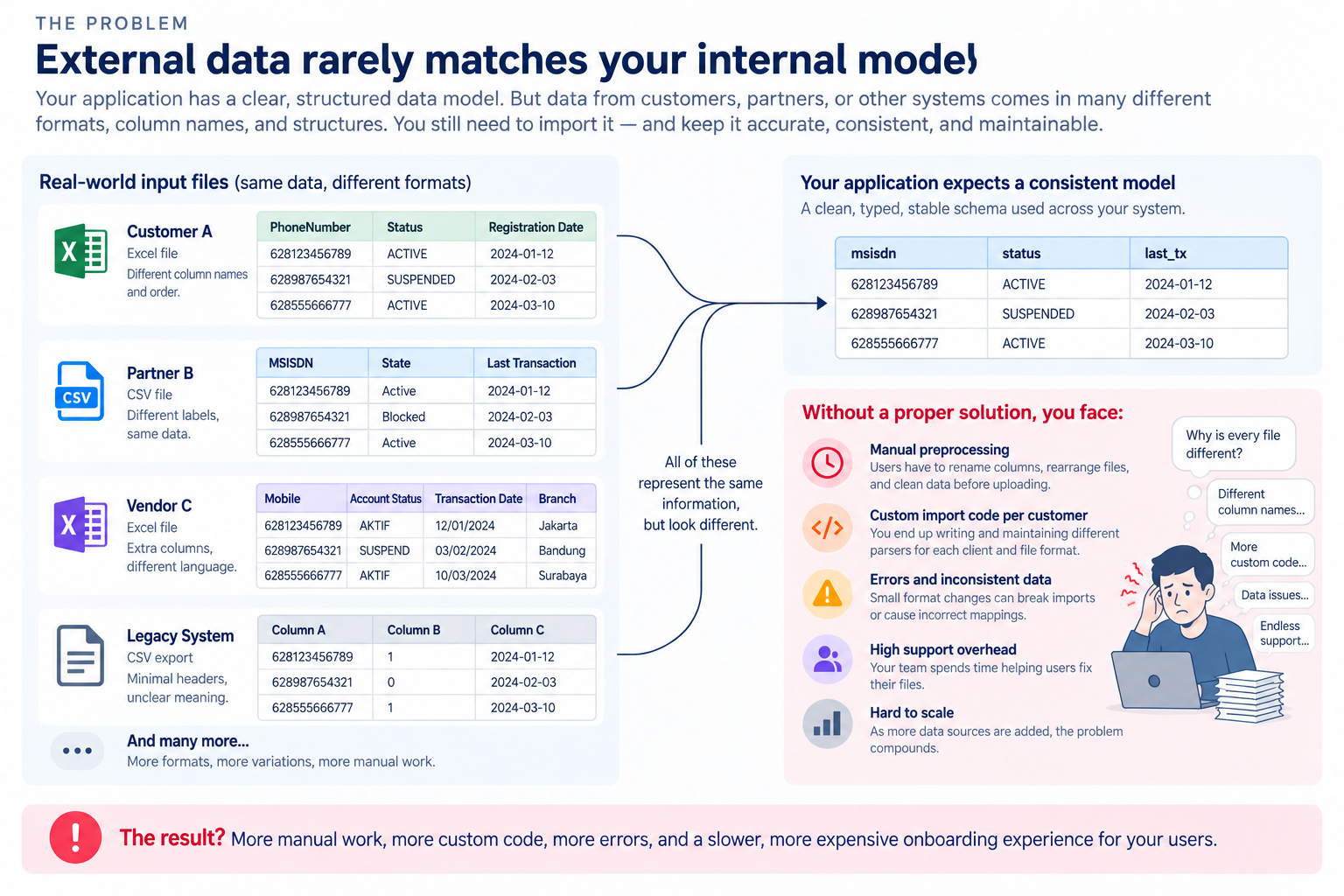
Manual preprocessing
Section titled “Manual preprocessing”Someone opens the spreadsheet and:
- renames columns,
- moves columns,
- converts values,
- exports another file,
- uploads it again.
This works, but it creates recurring operational work.
Client-specific import code
Section titled “Client-specific import code”The backend contains logic such as:
if client == A:    PhoneNumber → msisdn
if client == B:    MSISDN → msisdn
if client == C:    Mobile → msisdn
This becomes increasingly difficult to maintain as more customers and file formats are added.
Automatic guessing
Section titled “Automatic guessing”Another option is trying to automatically determine what every column means.
That can help in some cases, but it introduces uncertainty into a process where importing the wrong data can be worse than asking the user to make one explicit choice.
Mapper takes a different approach.
The Mapper Approach
Section titled “The Mapper Approach”Mapper treats external column names as labels, not semantics.
It does not need to understand whether:
Nomor HPPhone NumberMSISDNMobilemean the same thing.
Instead, Mapper presents the source file and target schema visually.
The user creates the mapping.
SOURCE                              TARGET
[0] PhoneNumber  ●────────────────● msisdn[1] State        ●────────────────● status[2] Date         ●────────────────● last_tx
Internally, Mapper stores only the machine identity:
{ "mappings": [ { "source": 0, "target": 8374629102847361 }, { "source": 1, "target": 4738291057284910 } ]}Source fields use their column index.
Target fields use a stable field ID generated from the application schema.
Human-readable names remain metadata.
This makes the mapping:
- deterministic,
- language independent,
- compact,
- portable across frontend and backend implementations.
How Mapper Solves the Problem
Section titled “How Mapper Solves the Problem”Mapper separates the import process into a few small responsibilities.
Schema +Uploaded File +User Mapping ↓ Mapper ↓Typed Application Records ↓Your Business LogicThere are four major pieces.
1. Schema Compiler
Section titled “1. Schema Compiler”Your application starts by defining the data it expects.
For example:
version: 1
model:  name: subscriber
  fields:    - name: msisdn      type: string      required: true
    - name: status      type: string      required: true
    - name: last_tx      type: datetime
The Mapper compiler turns this into:
YAML Schema ↓Schema Compiler ↓Native Backend Model+Runtime Schema Descriptor+Stable Field IDsFor Go, for example:
type Subscriber struct { Msisdn string Status string LastTx *time.Time}The same generated schema metadata is also exposed to the frontend.
This keeps the backend model and mapping interface synchronized.
2. File Analysis
Section titled “2. File Analysis”The user uploads a CSV or Excel file.
Mapper analyzes its structure. customers.xlsx, sheet Customers comes back looking like the spreadsheet itself:
| A | B | C | |
|---|---|---|---|
| 1 | PhoneNumber | Status | Date |
| 2 | 628123456789 | ACTIVE | 2026-09-20T10:00:00Z |
| 3 | 628982700101 | ACTIVE | 2026-09-19T08:12:44Z |
Mapper does not try to determine what those columns mean.
It only reports what exists.
A small number of sample rows may also be returned so the user can understand the contents.
For larger files, the upload mechanism can be replaced with a resumable upload implementation.
All upload mechanisms eventually produce the same abstraction:
FileIDAfter that point, the mapping system does not care whether the file arrived through:
multipart uploadTUScustom upload protocol3. Visual Mapping
Section titled “3. Visual Mapping”The Frontend SDK retrieves both:
SourceAnalysis+TargetSchemaand renders them as a mapping graph.
┌──────── SOURCE ────────┐ ┌──────── TARGET ────────┐│ │ │ ││ PhoneNumber ● ├───────┤ ● msisdn ││ Status ● ├───────┤ ● status ││ Date ● ├───────┤ ● last_tx ││ │ │ │└────────────────────────┘ └────────────────────────┘The frontend does not execute the transformation.
Its job is to let the user build a portable MappingSpec.
The graph itself is only a visual editor for that specification.
4. Import Execution
Section titled “4. Import Execution”When the user starts the import, the frontend submits:
FileID+SchemaID+MappingSpecThe backend then performs:
open file ↓validate mapping ↓compile execution plan ↓read row ↓map source indexes ↓convert target types ↓validate required fields ↓produce RecordThe result is a typed record matching the application’s target schema.
Your Application Owns the Business Logic
Section titled “Your Application Owns the Business Logic”Mapper deliberately stops before deciding what to do with the imported data.
The SDK provides an ImportProcessor abstraction.
For example:
processor := mapper.ImportProcessorFunc(  func(    ctx context.Context,    info mapper.RowContext,    record mapper.Record,  ) error {
    return repository.Save(ctx, record)  },)
svc := mapper.New(  mapper.WithFileStore(store),  mapper.WithSourceAdapter(csv.New()),  mapper.WithImporter(executor.New(    executor.WithImportProcessor(processor),  )),)
Your processor may:
insert into PostgreSQLcall a domain servicepublish to Kafkacall another APIwrite to object storageperform additional business validationMapper handles data mapping.
Your application handles business behavior.
What Mapper Is Not
Section titled “What Mapper Is Not”Mapper is intentionally not a general-purpose ETL engine.
It does not aim to become:
workflow orchestrationarbitrary scriptingdata warehouse transformationgeneral integration platformIts primary job is narrower:
Take arbitrary tabular input, let the user explicitly map it to an application-defined schema, and deliver deterministic typed records to application code.
That narrow boundary is what keeps Mapper embeddable, predictable, and adaptable across different backend stacks.